Showing posts with label HOW TO. Show all posts

Tuesday, 11 June 2013

FACEBOOK MULTI COLOR CHAT TEXT CODE GENERATOR BY TECHNOCLOUDS Version 2.0

Chat with your facebook friends in colored text with latest facebook color chat text code generator.Take a look at the picture below.


Multi- Color Facebook Chat Code Generator By TechnoClouds

Copy generated code and paste in chat box


Copyright © 2013 By @ TechnoClouds

Tuesday, 28 May 2013

How to: USE ANY SIM IN ANY MODEM WITHOUT UNLOCKING

How to: USE ANY SIM IN ANY MODEM WITHOUT UNLOCKING


Its not possible to use any Sim in a modem without unlocking. For that you have to Pay. 
But don't worry with the following trick you can do it for free :-) 

Step by step instruction: 

1. Insert SIM in Modem 

2. Modem show invalid SIM, just ignore it and close modem software. 

3. Start NOKIA PC suite. 

4. Go to Nokia pc suite connect to internet option. 

5. Go to Configure. Select your data card modem,and make all operator apn setting as like when we use Nokia mobile connection. 
Eg:- Apn for Airtel – airtelgprs.com

6. Finish set up. 

7. Now connect to internet through PC suite. 

8. Wow your net is connected without unlocking the modem.

Tags: Unlock Idea modem,Unlock Airtel modem,Unlock Tata Photon net Hauwei modem unlock,Unlock modem without software.

How to: CHANGE FACEBOOK PASSWORD WITHOUT KNOWING CURRENT PASSWORD


What if by chance you get a facebook user account who has not logged out from his/her email id.

You can take advantage of this golden opportunity and change his/her facebook email id password without even knowing his current password. This would help you to login in the id whenver you want.
Here are some simple steps to follow to change the password without even knowing the current passwords.

Step 1. Click the link below and open it in new tab in your browser. 
CLICK HERE.

Steps 2. Click on Continue as shown below.


Step 3. Just fill up the New password and confirm password and hit continue.


you just changed the password.


How to: SPEED UP YOUR PC WITH 20 SIMPLE TIPS

How to: SPEED UP YOUR PC WITH 20 SIMPLE TIPS


1. Wallpapers: They slow your whole system down, so if you're willing to compromise, have a basic plain one instead!

2. Drivers: Update your hardware drivers as frequently as possible. New drivers tend to increase system speed especially in the case of graphic cards, their drivers are updated by manufacture very frequently.

3. Minimizing: If you want to use several programs at the same time then minimize those which you are not using. This helps reduce the overload on RAM.

4. Boot Faster: The 'starting Windows 98/XP' message on startup can delay your booting for a couple of seconds. To get rid of this message go to C:/ and find file Msdos.sys. Remove the 'Read Only' option. Next open it in notepad or any other text editor. Finally go to the text 'Options' within the file and make the following changes: Add BootDelay=0. To make your booting even faster, set add Logo=0 to remove Windows Logo at startup.

5. Restart Only Windows: When restarting your PC, hold down Shift to only restart Windows rather than the whole system which will take a fraction of the time.

6. Turn Off Animations: Goto Display Settings from the Control Panel and switch to Effects Tab. Now turn off Show Windows Content While Dragging and Smooth Edges On Screen Fonts. This tip is helpul with Windows XP because of the various fade/scroll effects.

7. Faster Start Menu Access: Goto Start menu and select Run. Now type Regedit and hit Enter. The Registry Editor will appear on the screen. Now open the folder:
HKEY_CURRENT_USER\Control Panel\Desktop. You should see MenuShowDelay value. If you don't then right click on the blank space on the right pane and select New/String. Change the name in the new value to MenuShowDelay. Now that we have MenuShowDelay value, double click on it and enter 0 in the value data field. This sets the Start Menu delay to 0 milliseconds.

8. Resolutions:  If you are willing to do anything for faster performance from your PC, then try lowering your display resolutions. The lower it is, the faster your PC.

9. Turn Off Active Desktop: Go to your Display Properties and switch to Web tab. Uncheck View My Active Desktop As a Web Page. Since the Active Desktop option under Windows 98 uses a lot of system resources, this option can have a dramatic effect on the speed of the whole system.

10. Defragment Often: Windows 98's Defrag tool uses Application Acceleration from the Intel which means that when you defragment your drive, data is physically arranged on the drive so that applications will load faster.

11. Take Your PC To Bed: Using Advanced Power Management under Windows 98 gives you the option to use the sleep command. That way, you can send your PC to sleep instead f shutting down and restarting it. It's simple as pressing a button and then pressing the same button to wake it up. You can tell Windows after how many minutes/hours of inactivity to automatically sleep the machine in Advanced Power Management section of the Control Panel.

12. Faster Internet Access: I you use the internet for reference and the sites you visit are rarely updated then try the following. In Internet Explorer(the same can be done in Netscape) go to Tools, Internet Files section. Finally, select Never for the first option and double the amount of storage space to use, click OK!

13. Benchmarking: Benchmarking can be very useful when run frequently. IT can tell you hoe your PC's components are performing and then compare them to other machines like yours. For example, when you overclock your PC, you want to know how much more speed you have and weather it is suitable. All this and more can be discovered using benchmarking. An excellent piece of software for doing this job is SiSoft Sandra which can be found in the Downloads File Archive!

14. Refresh The Taskbar Without Restarting: If you in some way change the taskbar, either in Regedit or elsewhere, you canrefresh the taskbar without restarting. Hold down Ctrl Alt Del, and double click on Explorer. Say Yes to close Explorer, but no to closing Windows. This will refresh the Taskbar in system tray.

15. Quick CD Eject: Instead of pushing the button on your drive, right-click your CD drive letter in My Computer and click Eject. This will also remove any icons that have become associated with the CD drive.

16. Start Up Programs: Windows can be slowed down when programs run on start up. To eliminate this, check your Start up folder. You can access it from the Start Menu: Start, Programs,Start Up. Another way to eliminate programs from loading even before Windows actually starts is by doing the following: Click on Start, then Run. Type msconfig. It will take a quite a long time for this program to load, but when you finally see it on your screen, explore the different tabs. They all have to do with how quickly your PC oots, so selct what you want, and uncheck what you dont want!

17. Fonts: When Windows starts, it loads every single font in the Fonts folder. Therefore, thr more fonts you have, the slower the booting process. To get rid of unwanted fonts, simply go to the Fonts folder under C:\Windows and remove whatever you don't want. Fonts that have a red letter 'A' as their icon are system fonts, so don't delete them.

18. Stretching Wallpapers: Don't "stretch" your wallpaper in Windows 98 since it actually slows down when ou drag icons around on the desktop.

19. RAM Matters: If you have less than 128MB then you should seriously think of upgrading it to at least 256MB or 512MB. Windows runs much more smoothly with 512MB or higher and tends to use less hard disk space for virtual memory.

20. Partitioning: A very nice little thing you can do to boost system performance. By partitioning your hard drive, splitting one physical drive into several logical ones, you can gain several advantages. 1. If you get a virus or you accidentally format a drive, not all will be lost. 2. By placing the swap file (Win386.swp) on a separate drive, The swap file will be less fragmented and thus, faster. 3. Place Windows on a separate drive and whenever you need to reinstall it, you rest assures that your data is safe on a separate drive. Partitioning can be done using a few programs such a FDisk which comes with DOS. However, FDisk formats everything on the hard disk before partitioning. Alternatively, you can use Partition Magic from Power Quest to partition your hard drive without losing your data.

Monday, 20 May 2013

HOW TO:POST NEW FACEBOOK EMOJI CODES (2013) IN POSTS AND COMMENTS

Impress your friends in facebook with new cool emoji code trick in facebook posts and comments


Use column name and row name to find your desired emoji and copy paste it in facebook posts or comments

|New Facebook Emoticons 2013| 


Also try

Thursday, 25 April 2013

HOW TO OPEN AND WATCH YOUTUBE VIDEOS IN PAKISTHAN WITH PAKISTHANI IP ADDERSS

HOW TO OPEN AND WATCH YOUTUBE VIDEOS IN PAKISTHAN WITH PAKISTHANI IP ADDERSS


5 Easy and Simple Steps Of how To Open Youtube in Pakistan With Pakistani IP

1.Right Click on Network and Select Properties


2.Now Click on Change Adapter Settings


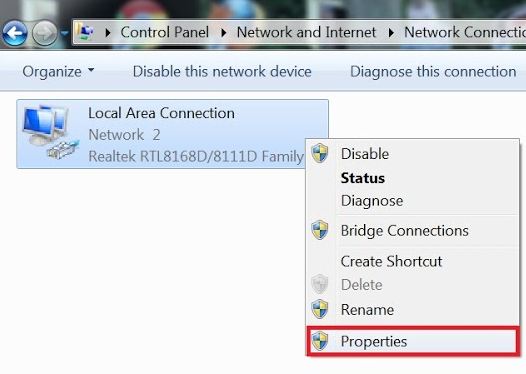
3.Now Right Click On Local Area Connection and Select Properties


4.Now Click on Internet Protocol Version 4 (TCP/IPv4) and Select Properties


5.Now Select Use The Following DNS server address:
   Now in This Add Google DNS Which is
   8.8.8.8
   8.8.4.4 and Click Ok


open youtube with Https : https://www.youtube.com

( it will take some time to open just wait till full page open )

Please Like and Share Our Post


Saturday, 23 March 2013

HOW TO ADD FACEBOOK COMMENTS TO BLOGGER BLOG WITH NOTIFICATION ENABLED 2013 (100% WORKING WITH ALL TEMPLATES)


Facebook has released many plugins for blogs and websites.In 2009 Facebook developers introduced their best social plugin called "Facebook Comments Box". This plugin can be embedded in any website or blog. With the Comments Box, Facebook users on your site can comment on your content, post those comments to their profiles, and share them with their friends on Facebook.

How To Add Facebook Comments Box To Blogger

There are about five steps to get this done but chill out, it’s easy, ok?  Just follow the steps and you’ll have a nice Facebook comment box installed on your blog in no time.

Creating a Facebook Application:

1.Go To Facebook Developers Page

2.Enter your app name and name space


3.Fill the required fields,in app domain enter your domain name or blogspot.com if you have no custom domain


4.Scroll down and hit save changes,now you are done with creating facebook application.On the same page copy your App ID and save it in notepad.

Adding codes to your Template

1.Go to Blogger Dashboard -->Template -->Edit Html (Tick Expand Widgets Template)

Note:-Always Backup your template Before proceed.

2.Search(Ctrl+F) for <html  and replace it with the following code.

<html xmlns:fb='http://www.facebook.com/2008/fbml'

3.Find For <body> tag and add the following code just after it.

<div id='fb-root'/><script>    window.fbAsyncInit = function() {    FB.init({      appId  : &#39;YOUR_APP_ID&#39;,      status : true, // check login status        cookie : true, // enable cookies to allow the server to access the session      xfbml  : true  // parse XFBML    });  };    (function() {    var e = document.createElement(&#39;script&#39;);      e.src = document.location.protocol +   &#39;//connect.facebook.net/en_US/all.js&#39;;    e.async = true;      document.getElementById(&#39;fb-root&#39;).appendChild(e);    }());</script>

Note:: Replace YOUR_APP_ID with your app id you just noted down.

4.Now search(Ctrl+F) for </head> and add these open graph meta tags just above it.

<meta expr:content='data:blog.pageTitle' property='og:title'/><meta expr:content='data:blog.url' property='og:url'/><meta content='TechnoClouds Blogger Tutorials' property='og:site_name'/><meta content='YOUR_BLOG_LOGO_IMAGE_LINK' property='og:image'/><meta content='YOUR_APP_ID ' property='fb:app_id'/><meta content='http://www.facebook.com/TechnoClouds' property='fb:admins'/><meta content='article' property='og:type'/>

Note::
i)Replace TechnoClouds Blogger Tutorials with your blog name.
ii)Replace YOUR_BLOG_LOGO_IMAGE_LINK with your blog logo image url.
iii)Replace YOUR_APP_ID with your app id you noted Down.
iv)Replace http://www.facebook.com/TechnoClouds with your Facebook page url.

5.Now Search(Ctrl+F) for this Code.

<data:post.body/>

If you find 3 occurrence of  <data:post.body/> then add the above script after the first occurrence of it.If it doesnot work, try with second occurance.

<b:if cond='data:blog.pageType == &quot;item&quot;'><div style='padding:20px 0px 5px 0px; margin:0px 0px 0px 0px;'><script src='http://connect.facebook.net/en_US/all.js#xfbml=1'/><div> <fb:comments colorscheme='light' expr:href='data:post.url' expr:title='data:post.title' expr:xid='data:post.id' width='550'/></div><div style='color:#fff; background-color:#3B5998;border: solid 1px #ddd; font-size:10px; padding:3px; width:550px;'>Facebook Comments Plugin Enhanced by <a href='http://www.technoclouds.blogspot.com' target='_blank'><b>TechnoClouds Blogger Tutorials</b></a></div></div></b:if>

Note::
i)You can change the width of widget by replacing 550 with your desired width.
ii)As you all know you can change the color scheme to light or dark.
iii)Go to blogger dashboard --> Settings --> post and comments and set comment section as HIDE.

6.Save your Template.

If any Problem than Please comment below..............!!!!!

Saturday, 23 February 2013

HOW TO:POST PHOTO OR A VIDEO IN FACEBOOK WITH YOUR FRIEND'S ACCOUNT

This is a facebook trick to post a photo or a video with your friend's profile.To use this trick, just follow the steps below.


Post a photo or a video with yours friends profile(Facebook hack)

  1. Send this link to your friend ( https://m.facebook.com/upload.php?email&_rdr )
  2. This will opens a new tab like as the above image
  3. Ask the victim to send you the email address that he see in the new page, which will be just like in the above image
  4. Login to ur email account writte down the email adress u received and than type the u wanted to post!!! click on send
  5. And that will be posted on yours friend's timeline.
Note: Don't misuse this trick

Monday, 11 February 2013

HOW TO GET REAL HUMAN VISITORS TO YOUR BLOG OR WEBSITE FOR FREE

Many newbies are worried about how to get real human visitors to their blog or website for free.So,here I am going to show the easiest way to generate traffic to your site without any cost.

TraffUP.Net is the #1 tool for generating more traffic on your website from all around the world.

TraffUP.Net really generates website traffic instantly. Within a few minutes of adding my website, I noticed traffic from all over the world. I highly recommend it for free advertising and generating more traffic on your website. 


Get free traffic

What is traffup.net?

Traffup.net is traffic exchange system where you earn points for visiting other peoples websites and where you give away points to other people if they visit your website. 

In a nutshell: You get visitors to your website as long as you have enough points. You earn these points by visiting other 
websites.

You can also use your points to get twitter followers or retweets instead of website traffic.

Here's how it works:

1) Add your website

Sign up, add your website for free and get 100 bonus points.
Assign some points to your listing. Visitors earn these points from you when they visit your website.


2) Attract visitors

Traffup users prefer to visit websites that offer more points.
Assign more points to receive more visitors and display your listing on top in search results.

3) Collect points

Your website is visible as long as you've points in your account.
Visit other websites on Traffup to earn free points or buy points pack to keep your website visible.


Thursday, 17 January 2013

HOW TO ADD ALL YOUR FACEBOOK FRIENDS TO A GROUP IN ONE CLICK

To add all your facebook friends to a group in one click, just follow the steps below


  • Open mozilla firefox.
  • Click Shift + Ctrl + K.
  • Copy the code below.
  • Now paste this code in the empty box as shown below and hit Enter.


Monday, 31 December 2012

TORRENT TO DIRECT DOWNLOAD

Torrent to direct download

It takes much time to download files using torrent downloaders.In this tutorial I will teach you how convert  torrent download to direct download.It is very simple if you follow the below steps.


  • Visit a torrent site and download the torrent you need.

  • Download the torrent file or just copy the link.

  • Open this site [Link]

  • Upload your downloaded file to the site or just paste the torrent link.

  • Now press go button.

  • Click on free.

  • After the caching completes,click on download.

  • Select free again and the download starts.

For faster downloads,use Internet Download Manager.Click here to download.

Monday, 10 December 2012

How to bypass youserials.com surveys for getting keys

Hi friends.I know we always search for full version softwares or free serial keygens for the softwares.It takes much time to search for free keys for making the software full version.But, now I will tell you the simple trick to get free keys.

Follow the below steps to get serial keys.

Step 1 : Go to  [ Link ]

Step 2 : Search for any key you need.

Step 3 : Now check the address bar, you will get last alphabet of the link as "XXXXX"

Step 4 : Copy that and paste any where say notepad.

Step 5 : Now type in another window " youserials.com/jq_serial.php?id=XXXXXX "

Step 6 : Replace the XXXXXX with the code you have copied in Step 4 and goto the site,you have done.

Monday, 22 October 2012

HOW TO:Post To All Of Your Facebook Groups In One Click

I think this post is very useful for facebook users to share anything to all facebook groups just in one click.Now you can do 100 or most work one time. Go to your website and choose your selected post. After go to your facebook site.

NOW DO THIS ONE 

Go to this site


After


OR USE THIS SITES 


Tuesday, 16 October 2012

How to:Update Your Facebook status from different phones (Iphone,Blackberry) without any Application - Online


Update Your Facebook status
from different phones (Iphone,Blackberry) without any Application - Online


Facebook Android

Update Your Facebook status
via different phones.No need to use any app like Show Off.Just in the bellow section choose your phone and go with that.


Iphone 5 - Here

Iphone 4S- Here

Apple Ipad- Here

Blackberry- Here

NASA satellite- Here


Thursday, 11 October 2012

HOW TO:SEND FREE SMS DIRECTLY TO ANY MOBILE PHONES IN THE WORLD FROM YOUR GMAIL ACCOUNT

Google has introduced a new feature in Gmail. Now you can send SMS to any mobile in the world through your Gmail by just entering the mobile number. This made Gmail more interesting and the delivery time of the sms is so fast that it will be delivered with in 5 seconds.This is available for all your Gmail accounts.The SMS service can also be accessed from its GTalk application and also from the GTalk integration in Gmail. 

Though there has not been a formal announcement in this regard, Gmail users have been getting a notification indicating the same.

The service has been active for quite some time, but it is only now that Google has made it public.

According to Google, the service is supported by all operators in India and the US, but not by all operators in other countries.

This is available in Afghanistan, Algeria, Angola, Bahrian, Bangladesh, Benin, Egypt, India, USA and many other countries are listed here .

Procedure:

You can send SMS messages to your contacts’ mobile phones using Gmail Chat. To do so from Gmail:
  1. Enter your contact’s name in the ‘Search or invite friends’ box in Chat, and select Send SMS from the box of options that appears to the right of your contact’s name. Or, if you already have a Chat window open for this contact, just click Options, and select Send SMS.
  2. In the dialog box, enter a phone number in the ‘Send SMS messages to this number’ field. This feature is only launched in selected countries. Click here for the list of supported countries and operators. If you are not located in one of these countries you can still use it, but you won't see the SMS option in Chat until you enable it manually in the Chat settings page.
  3. Click Save.
  4. A Chat window appears. Just type your message as you would normally. When you hit Enter, the message will be sent to the phone number you entered.
If your contact replies, the text message response will appear as a reply in Chat. These conversations are stored in your Chat history just like regular chats (but keep in mind that you can’t go off the record while communicating via SMS).


SMS credits

All users get 50 credits every day. Every time the user sends a SMS, one credit is deducted. If the user receives a reply, five credits are credited to the user’s account, but the total number of credits will not exceed 50.

If you run out of credits, you will get a fresh set of 50 credits the next day, but you can always “buy” credits.

Says Google: “Keep in mind that if you'd like a higher message credit, you can always send an SMS to your own phone, and then reply to that message multiple times. Every time you send a reply message, your SMS credit is increased by five. Effectively, you're buying more messages by paying your phone company for these outgoing messages.”

What’s the catch?

If the service is free, is there a catch? Yes, but a minor one. Says Google, “If you are attempting to send an SMS message via chat in Gmail and are told that the recipient must reply before more messages will be delivered, you will not be able to send your message until they do so. At this time, if they are unable to respond, you will be unable to send additional text messages to this contact.

“To prevent abuse, any Gmail user who sends an excessive number of SMS messages from Gmail, without getting any responses in return, will be blocked from sending further SMS messages.”

Saturday, 15 September 2012

How to Convert Any Video Using VLC Media Player

Click on the Media option in the Menu bar and select “Convert/ Save…” option


Click on the Media option in the Menu bar and select “Convert/ Save…” option


In Convert window option and you would get a window that lets you specify the format and the location to save the video.


Click Start to start this converting process. Now you can save a Music Video as a MP3 file on your PC

How to Recover Data from a Corrupt Memory Card or USB Drive

I opened up my file manager on my phone and there was no storage card! I popped the Micro SD card out and threw it into an adapter. The adapter let me slide the card into it and then it has a USB adapter on the end. I plugged it into my laptop and my machine recognized it as a drive and gave it a letter. But when I went to click on it I get a error box with a message. It says E:\ is not accessible. The file or directory is corrupted and unreadable. DAMN! DAMN! DAMN!


Ok time for a little command line magic. I hit the start menu ““ run and typed CMD to bring up a command prompt. Then I typed Chkdsk e: /r


The chkdsk command checks a disk for structure corruption. The e: tells it what drive letter to use and the /r tells it to repair the issues it finds. You may see the warning that your drive is not a Windows XP drive ““ this is not an issue. You can continue on by pressing Y to continue. It will start to run through the files and directories. You will feel a lot better when you see your file names”¦ It proves all is not lost! Aren’t you glad you went this route instead of formatting it?


When it is almost complete it will ask you if you want to save lost chains into files ““ I always pick yes but have never used those files once to this day!


Chkdsk will report back what it has done and then go to my computer and check out your drive. Mine opened at this point and I was able to get to all my data as you can see below


I then popped my Micro SD card back into my Windows Mobile and was good to go. All in about 7 minutes on the train. Not too shabby eh?
Do you have any repair stories to share with us? Leave them in the comments. Your hardship and work might just help someone else out!


Complicated?
If you have any question about any Post, Don't hesitate to ask question.You can simply drop a comment below post.Your Feedback always appreciated.