
Showing posts with label Apple. Show all posts
Showing posts with label Apple. Show all posts
Friday, 17 May 2013

Tuesday, 16 October 2012
How to:Update Your Facebook status from different phones (Iphone,Blackberry) without any Application - Online
Update Your Facebook status
from different phones (Iphone,Blackberry) without any Application - Online

Update Your Facebook status
via different phones.No need to use any app like Show Off.Just in the bellow section choose your phone and go with that.
Iphone 5 - Here
Iphone 4S- Here
Apple Ipad- Here
Blackberry- Here
NASA satellite- Here

Sunday, 5 August 2012
Images of 7-inch iPad shell surface
You might have heard by now, unless you’ve been living under a rock, that Apple is making a 7-inch iPad. Well, we know that the company at least considered it. In fact it might look a lot like this image here.

It is claimed that these images are authentic iPad parts. They surfaced on Chinese social media site Sina Weibo. There’s really no info there to confirm anything and frankly the lack of acamera hole is enough to make you skeptical. Then again, if these were early parts, it could always be something that is added later.
For now, we can only hope and speculate. What do you think? Is this legit or totally bogus? Let us know what you think.

It is claimed that these images are authentic iPad parts. They surfaced on Chinese social media site Sina Weibo. There’s really no info there to confirm anything and frankly the lack of acamera hole is enough to make you skeptical. Then again, if these were early parts, it could always be something that is added later.
For now, we can only hope and speculate. What do you think? Is this legit or totally bogus? Let us know what you think.
Thursday, 5 July 2012
Samsung And Apple Drop Additional Patent Claims Ahead Of Trial
Apple and Samsung are currently engaged in a major court case in the US, we recently saw a couple of Samsung’s product banned for sale in the US,the Galaxy Tab 10.1 and the Samsung Galaxy Nexus, the fate of both devices will be determined at the upcoming trial.
Now both Samsung and Apple have reduced their patent claims against each other ahead of the trial, this was done at the request of Judge Lucy Koh, although this is something that Judge Koh could ask for again if she feels that the two companies have not reduced the claims enough for the actual trial.

Apple dropped U.S. Patent No. 7,663,607 on a “multipoint touchscreen”. The ’607 patent would be a very powerful hardware patent, but courts tend to be skeptical of its validity, and even if they deem it valid in part, it appears that they tend to narrow its scope. Apple was only asserting one remaining claim from this patent and withdrew it (without prejudice, i.e., it may reassert it at some other point).
Apple furthermore narrows its trade dress claims. Those relate to the packaging of products. It proposes the dismissal, again without prejudice, of its trade dress allegations against the original 7.0-inch Samsung Galaxy Tab. “Apple also clarifies that it is not accusing the F700 [smartphone] of infringing Apple’s trade dress.”
After just losing an entire patent on summary judgment, Samsung didn’t want to drop another patent, but it has reduced the number of claims (from its six remaining patents-in-suit) from 15 to 9. Samsung will assert two claims each from three of its patents, and one claim from each of its other three patents.
Sunday, 24 June 2012
HTC teases new voice assistant to compete with Apple’s Siri
Apple’s voice assistant Siri is pretty popular, with the likes of Zooey Deschannel and Samuel L. Jackson having some fun with it in recent ads, but HTC is ready to launch their own version of the vocal helper

On Friday HTC posted an image on its Facebook page teasing a voice assistant that would obviously compete with Apple’s Siri and Samsung’s S-Voice. The image features the caption, “Ever wonder what your pet has been trying to tell you all these years?” but don’t worry, they are not releasing something that will help you talk with the dog.
It makes sense that HTC would want a piece of the voice assistant pie, so this isn’t really surprising. It will be interesting to see what their version does and how people like it.
Apple iPad 2 Gets Dropped 100,000-Feet from Space Still Survives
Apple iPad 2 survive a 100,000-foot fall from space? Well, wonder no more as “G-Form wanted to demonstrate how well their Extreme Edge sleeve protects the iPad, so they hooked one up to a weather balloon, and sent it up 100,000 feet to the edge of space.” Video after the break.

New Apple iPhone 5 Picture Leaked
New Apple iPhone 5 Picture Leaked. Here’s How It’ll Look
The new Apple iPhone 5 is probably the most anticipated smart phone at the moment – they say it’ll be the only phone able to make a real competition to the Samsung Galaxy S3. According to the old Apple tradition, the iPhone 5 will most likely be launched in fall. And before that, we have some interesting leaked pics demonstrating its design and allowing us to make some assumptions on its features.
Not so long ago some pics showing different parts of the new iPhone 5 leaked, but now’s the first time we can see it assembled.


Well, the iPhone 5 (if it’s the real iPhone 5!) seems to be rather stylish. We can see on the pic that its display is bigger than that of the iPhone 4S, measuring at 3.8 or 4 inches or even more (let’s hope they haven’t made the screen bigger at the expense of the pixel density!). Unlike the glass body of the iPhone 4S, the chassis of the iPhone 5 is most likely made from metal and plastic; yeah, glass looks cool, but metal is more durable.
And here are the other leaked pics of the upcoming iPhone 5:


Saturday, 23 June 2012
How to Share Your Computer Network Connection with iPhone / Android / Symbian Phone / other PCs
It’s easy to use your mobile phone connection with your PC but it can be a bit technical trying to do it the other way round. You need to go to your active network connections and share your active network connection but this can be a bit technical if you don’t know much about these things. I can easily share my computer network connection with my iPhone through wireless connection without doing much settings.Connectify doesn’t do that only, it lets share your computer connection with computers around you so.
Connectify also allows you to password your internet connection so unauthorized users won’t have access to your connection. So, whether you need to share your internet connection with your Android device, iPhone, Symbian smartphone, your friends or any wireless enabled device, this software lets you do it even if you know nothing about networking.
How to use Connectify
I used Connectify to share my Windows PC network connection with my iPhone and a friend’s computer. I didn’t do much settings and you can even use this if you’re a total noob like me 
- First download Connectify and restart your computer
- Start Connectify and do the basic settings you’re going to need

- You must note that the password can only be between 0-9 and A-F.
- Click on Start Hotspot and search for your this network with another phone or any other computer around.
- Simply connect and input the WEP Key you set up earlier and you’re connected. Check out my phone’s screenshot below:
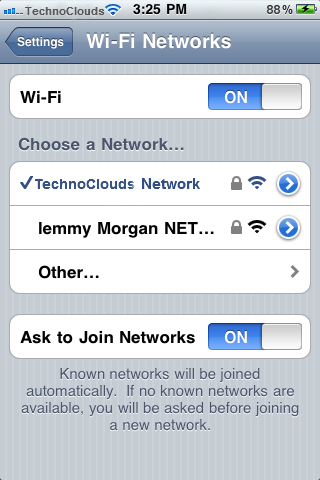
It’s as easy as that! Now you’re sharing your computer’s internet connection with your mobile phone. If there’s any unauthorized person connected to your network, you can easily detect and disconnect them by checking the Clients tab:
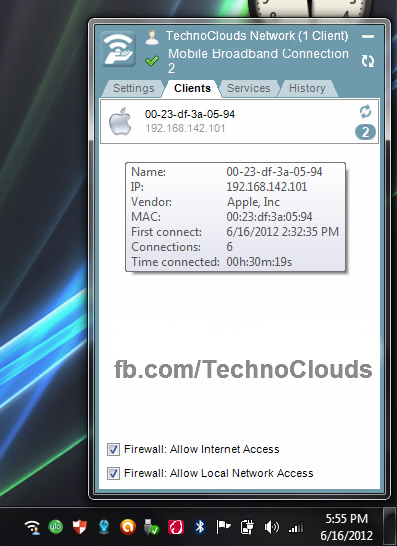
That’s my iPhone conected. Don’t get me wrong, this isn’t just for sharing your computer’s network connection with your mobile phone only, you can use it to share your connection with any wireless enabled device without much knowledge in networking. Cool, huh? 
Subscribe to:
Posts (Atom)
Complicated?
 If you have any question about any Post, Don't hesitate to ask question.You can simply drop a comment below post.Your Feedback always appreciated.
If you have any question about any Post, Don't hesitate to ask question.You can simply drop a comment below post.Your Feedback always appreciated.


 Posts
Posts

